Are you looking for McDVoice and wondering how to take the McDonald’s survey online? Want to know how the McDVoice survey works, what rewards you can get, and how to enter using your receipt? The McDVoice survey is an official customer feedback program by McDonald’s where you can share your experience and get rewards like discounts or free food offers.
In this guide, you’ll learn step-by-step how to complete the survey, the rules and requirements, how to use your validation code, and tips to successfully claim your reward. Whether you are a first-time user or a regular customer, this complete McDVoice guide will give you all the details you need in one place.
or
McDVoice Survey Details
| Feature | Details |
|---|---|
| Official URL | mcdvoice.com |
| Entry Method | 26-digit survey code on your receipt or alternate entry (store #, date/time, order details) |
| Receipt Window | Usually within 7 days of purchase |
| Survey Length | About 3–10 minutes (most finish in under 5) |
| Reward Type | BOGO offers (like Quarter Pounder or Egg McMuffin), free fries/drink, or discounts |
| Validation Code | Shown at the end—write it on your original receipt |
| Redemption | Show the receipt with the code on your next in-store visit |
| Languages | English and Spanish (may vary by location) |
| Per-Store Limits | Usually up to 5 surveys per month per store |
| Eligibility | Mainly for U.S. and Canada customers (check your receipt for rules) |
| Participation Notes | Employees and their family members are usually not allowed |
1. How to Participate
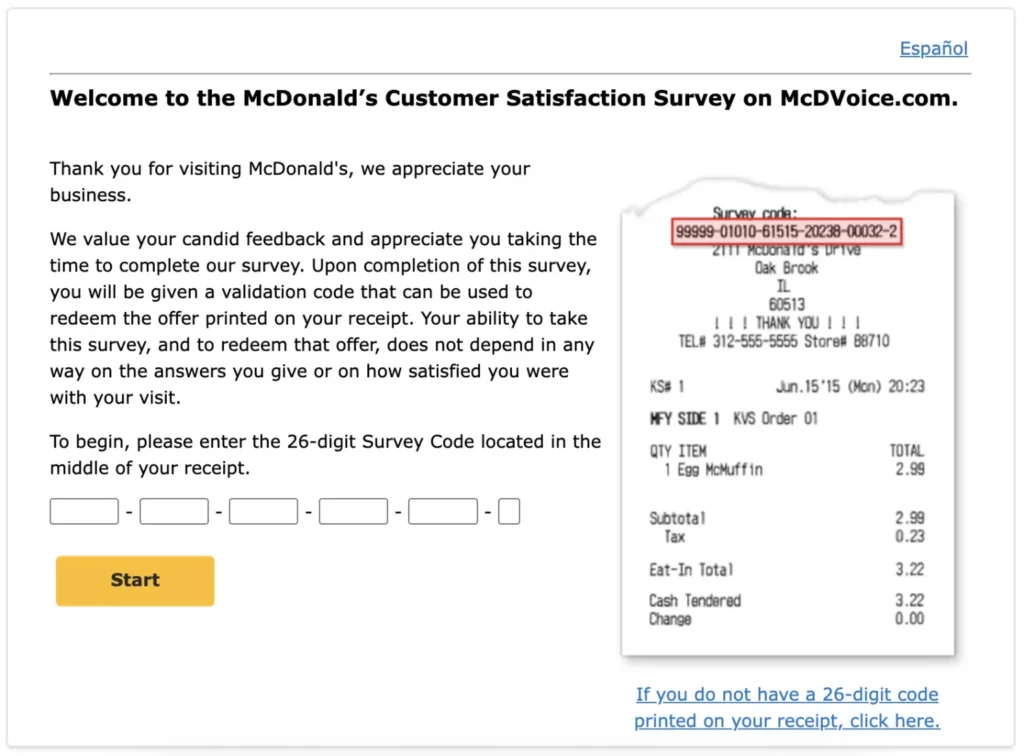
To take the survey, you must have a recent receipt from a McDonald’s restaurant.
Website: Go to www.mcdvoice.com.
The Survey Code: Most receipts feature a 26-digit survey code located in the middle.
No Code? If your receipt doesn’t have a 26-digit code, you can still participate by manually entering the Store Number, Date, and Time of your visit.
Time Limit: You usually must complete the survey within 7 days of your visit.
2. What the Survey Asks
The survey is designed to be quick (taking about 3–5 minutes) and covers:
Food Quality: Was your food hot, fresh, and tasty?
Service Speed: How long did you wait for your order?
Staff Friendliness: Was the team helpful and polite?
Cleanliness: Was the dining area or drive-thru clean?
Order Accuracy: Did you get exactly what you ordered?
3. Rewards & Redemption
Once you finish the survey, a Validation Code will appear on your screen.
Write it Down: You must write this code in the space provided on your original receipt.
The Offer: Rewards vary by location but often include a Buy One, Get One (BOGO) Free offer (like a Big Mac or Quarter Pounder) or a discount on your next purchase.
Expiration: Validation codes typically expire 30 days after the date of your original receipt.
Limit: Customers are generally limited to 5 surveys per month per restaurant.
4. Requirements to Join
Age: You must be 13 years or older (this can vary by region).
Receipt: A valid, recent McDonald’s receipt is mandatory.
Device: A smartphone, tablet, or computer with internet access.
Language: The survey is usually available in both English and Spanish.
Receipt age: Complete the survey within 7 days of your purchase (typical window).
One survey per receipt: Each receipt can generally be used once.
Per-store survey limit: Commonly up to 5 surveys per month per store.
Employee restrictions: Employees and immediate family are usually not eligible.
Offer expiry: Validation codes and rewards expire quickly. Many locations require redemption within 7–30 days—check your receipt.
Common Issues & Quick Fixes (Troubleshooting)
| Issue | What It Looks Like | Fast Fix |
|---|---|---|
| 26-digit code rejected | Error after entering code | Double-check every digit; avoid spaces; try on a different device/browser; ensure it’s within 7 days |
| No 26-digit code on receipt | No code field available | Click “If you do not have a 26-digit code…” and enter store #, date, time, order/amount |
| Survey page won’t load | Blank or looping page | Clear cache, disable ad-blockers, try mobile data instead of Wi-Fi, or try again later |
| Validation code not shown | Survey ends without code | Ensure all required questions were answered; if it still fails, you’ll need a new receipt to retake |
| Code not accepted in store | Cashier can’t apply offer | Confirm you’re at a participating location, inside the valid date window, and following the receipt’s rules (e.g., required purchase) |
| Receipt lost | No proof to redeem | You’ll need a new purchase and survey—codes are usually non-recoverable |
FAQs
1. What exactly is McDVoice?
McDVoice is McDonald’s official customer survey. You share your feedback about your visit and get a reward code in return.
2. Where do I find the survey code on my receipt?
You can find the 26-digit code on your receipt, usually in the middle or bottom. If there is no code, you can use store details like number, date, and time.
3. How long do I have to take the survey?
You usually have 7 days from your purchase date to complete the survey before the code expires.
4. What kind of rewards can I get?
You may get Buy One Get One Free offers, free fries or drinks, or discounts on your next order.
5. How do I get my free food?
After completing the survey, you receive a validation code. Write it on your receipt and show it at the store to claim your reward.
6. Does the validation code expire?
Yes, the validation code is usually valid for about 30 days after you receive it.
7. Is there a limit to how many surveys I can do?
Yes, you can usually complete up to 5 surveys per month per store.
8. Can I use the code on the McDonald’s app?
Most codes are used in-store, but some receipts may allow you to use the code in the app. Always check your receipt.
9. Why is my survey code not working?
It may not work if the receipt is older than 7 days, the code is entered incorrectly, or the website is temporarily down.
10. Do I have to buy something to take the survey?
Yes, you need a receipt from a purchase to enter the survey, but there is no minimum spending required.